The Lab
The small tools that make
the big ones usable.
A communication device is only as good as the hand, the head or the switch that reaches it. These are the tools we built because a person in front of us needed one and nothing suitable existed. They are free, they carry nothing we want to sell, and open with the same free Super account as the app.
Keyguard Studio
Design a keyguard in a browser tab.
A keyguard is the rigid plate that guides a hand to the right key. Draw one for any tablet, see it in 3D, and export a printable file. Free, and it runs entirely on your own machine.
Open the tool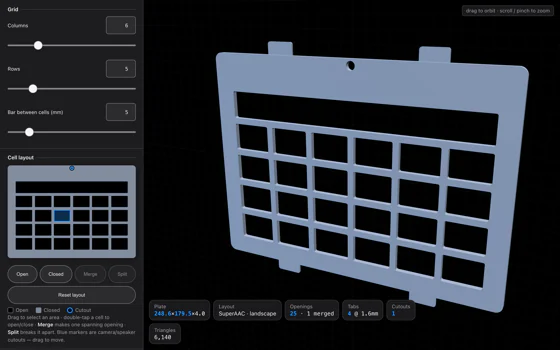
Holder Studio
Hold the tablet where
the person can reach it.
Design a holder for a tablet, with retaining lips, cutouts for the ports you actually use and a standard mount on the back. Prints in two pieces that snap together.
Open the tool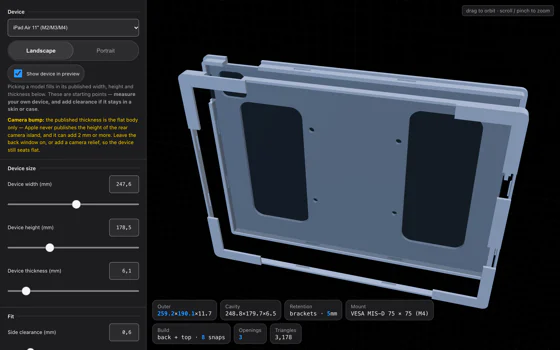
PAACs4Web
Symbols, over any page.
A browser extension that puts a PAAC symbol above every word it knows, on any website — the same picture-above-the-word the app draws in a board's writing area. Free, and nothing it reads leaves the machine.
About the extension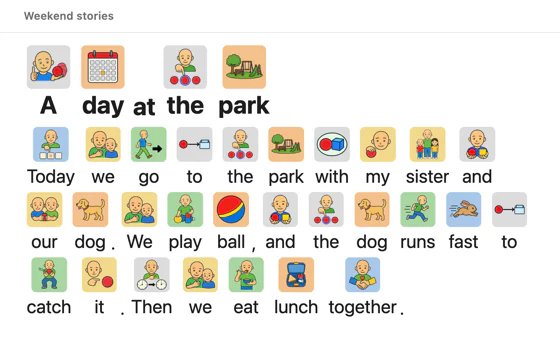
PAACs Lexicon
Every symbol, and a board to put them on.
All 688 PAAC symbols, each with its word, to search and filter by colour. Choose a grid, place the ones you need and save the board as a PDF. Free, and the board stays in this browser.
Open the Lexicon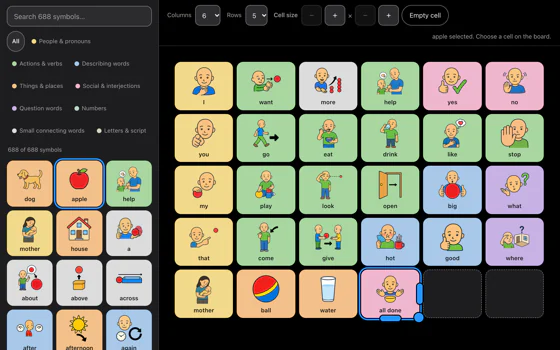
Head Tracking Mouse
Move the pointer with your head.
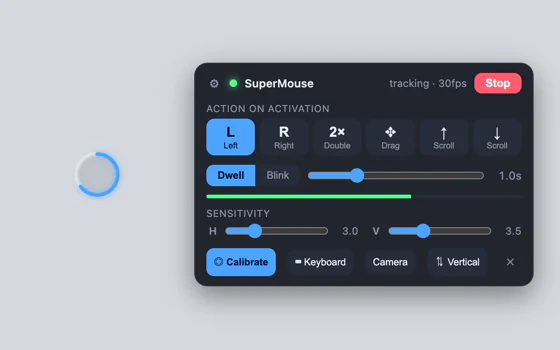
Uses the webcam the computer already has. No headset, no dot on your forehead, no calibration ritual. Click by holding still, or by a deliberate blink.
Available from December 1st.
Zaino Keyboard
Find the key by colour
before you can find it by letter.
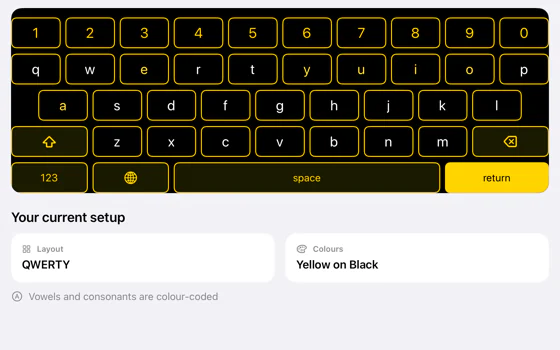
An on-screen keyboard that colours vowels warm and consonants cool and speaks each key as it is pressed. Every key can be reached by a single switch or by looking at it.
Keyguard Studio
A keyguard usually costs
a specialist visit and a wait.
This one is a web page. You pick the tablet and set the grid to match the board, or bring the board itself in from SuperAAC; then you drag the camera and speaker cutouts clear of the plate and watch it turn in 3D as you go. The file that comes out is an STL, which is what a 3D printer takes. Nothing is uploaded: the board file is read and the geometry is built and written in the browser.
- Tablet presets
- Fourteen iPad presets from 2018 to 2026, from the 7.9-inch mini to the 13-inch Pro. Each one carries the full body size, the exact screen area and where the front camera sits, so the margins and the camera cutout are placed for you, in landscape or in portrait. Any other size can be typed in by hand.
- The grid
- Up to 24 columns by 24 rows. Cells can be merged into one long opening for a sentence bar, or closed entirely where a board has no button. The bar between cells runs from 1.5 to 25 mm.
- SuperAAC boards
- Choose SuperAAC as the reference software and the openings land on SuperAAC's own cells on that iPad: the plate allows for the app's top bar, its page tabs, its margins and the gaps between cells, and for the Reachable area setting. Import a board exported from SuperAAC as a .saac file and the keyguard is drawn from it: an opening for each cell, one long opening where a cell spans several, and solid plate wherever the board is empty.
- Cutouts
- A round camera hole, 7 mm by default, and a rounded speaker slot at 16 by 3.5 mm. Both can be dragged into place or positioned by typing millimetres from the top-left corner.
- Mounting
- Slide-under tabs, so the guard holds against a silicone case without adhesive or magnets.
- What you get
- An STL file, free and unwatermarked. Opening the studio asks for a Super account, the same free one the app uses. Plate size runs from 50 to 400 mm per side and 1 to 12 mm thick, and every dimensional slider steps in tenths of a millimetre.
- If you cannot print it
- Send the design and we will quote printing and shipping before anything is made. This is a request by email rather than a shop.
Holder Studio
A tablet nobody can reach
is not a communication device.
A holder is the shell the tablet sits in: on a wheelchair mount, a table stand or an arm. The one that comes in the box rarely fits the chair, and a device at the wrong angle is one a person cannot look at, point at or press. This designs the shell around the tablet you have and the mount you own, and gives you the files to print it.
- The shell
- Built around the tablet's own dimensions, in landscape or portrait, with retaining lips that hold it in without hiding the screen.
- Openings
- Cutouts for the charging port, the speakers, the camera and the buttons — placed where they are on the device rather than where a generic case guesses.
- Retention
- A continuous lip or corner brackets, whichever suits the device and how often it comes out.
- Mount
- A standard VESA or AMPS bolt pattern on the back, so it meets the wheelchair mounts and arms that already exist rather than needing its own.
- Two pieces
- It prints as a front and a back that snap together, so it fits on a small printer bed and the tablet can be taken out without a tool.
- What you get
- Two STL files, free, exported in the browser. If you cannot print them, send the design and we will quote printing and shipping before anything is made.
Head Tracking Mouse
For people who cannot
use their hands.
The camera finds your face and follows the tip of your nose. Move your head and the pointer moves with it, the same way round as a mirror. To click, either stop moving and let the pointer settle, or blink on purpose. It can left click, right click, double click, drag and scroll.
- Clicking by dwell
- Hold the pointer still for a moment and it clicks. The wait is adjustable from 0.3 to 3 seconds; it starts at 1 second. The pointer has to leave a 35-pixel circle before it will fire again, so one pause cannot become two clicks.
- Clicking by blink
- A blink counts only if it lasts between 0.12 and 0.6 seconds. Anything longer is read as resting your eyes and ignored, which is what stops a tired blink from clicking something.
- Steadiness
- The pointer is smoothed with a One Euro filter, which lets a slow, careful movement stay precise while a fast one still keeps up. Horizontal and vertical sensitivity are set separately, because a head turns further side to side than it nods.
- Tremor and drift
- A small dead zone around the neutral position means the pointer sits still when you are trying to hold it still.
- Where it runs
- Windows today. A macOS version is written but has not been built or signed, so there is nothing to install on a Mac yet.
Zaino Keyboard
Two colours, so a letter
can be found before it is known.
Vowels are warm, consonants are cool, and every key says its own letter aloud when it is pressed. A child who cannot yet pick out a G can still tell that the key they want is one of the blue ones. It sits alongside ordinary typing rather than replacing it.
- The two colours
- Vowels in deep amber, consonants in a blue borrowed from painted tile. Both have a second, lighter pair for dark themes, so the distinction holds either way round.
- Spoken keys
- Pressing a key speaks the letter and lifts the key briefly under the finger, so the feedback is heard and seen at once.
- One switch
- Scanning steps through the keys and speaks what it lands on. It runs automatically on a timer, or one press at a time.
- Eye gaze and dwell
- Look at a key and a ring fills to show the wait. Dwell is never triggered by keyboard focus, so tabbing through the keyboard cannot type by accident; keyboard users press Enter or Space instead.
Available from December 1st.
The lab is open.
Most of what is on this page began as somebody saying that the thing they needed did not exist. If you are missing a tool, tell us what it would have to do.